

What this gives you
- Send a “you have received a coupon” notification to each customer after the distribution has finished for everyone, when you display a coupon. Some customers no longer get it early while the distribution is still running
- Set the hours when grant notifications are sent, for example 9:00 to 21:00. Coupons granted outside those hours are notified at the next start time, so push notifications don’t arrive late at night
In Shopify Flow, the trigger names are shown in English and Japanese: “Coupon granted (anytime) / クーポン付与(随時)” and “Coupon granted (distribution complete) / クーポン付与(配布完了時)”.
Until November 9, 2026, “Coupon granted (anytime)” was named “クーポンが付与された”. Only the name changed. Workflows you already created keep running.
What the distribution complete trigger covers
Runs for: coupons granted by the distribution when you display a coupon (the initial distribution). This includes “Display on account page” from the coupon list or the coupon detail page, automatic coupon display, and displaying a coupon again after hiding it. Doesn’t run for: syncs of a displayed coupon (such as a change of eligibility), coupons granted to new customers, and joining a segment (including the coupon claim button). Only “Coupon granted (anytime)” runs for those. The trigger runs once per customer. If you distribute a coupon to 10,000 customers, the workflow runs 10,000 times. Finishing all of them takes time depending on the number of customers and your plan.How to set it up
1
Add a condition to your "Coupon granted (anytime)" workflow (if you already use it)
If you send push notifications or emails from a “Coupon granted (anytime)” workflow, add the condition below first. If you enable the distribution complete workflow without it, customers in the distribution get the notification twice.Open the workflow in Shopify Flow, add a condition between the trigger and the action, and continue to the action only when “Grant source” is not equal to “initial_distribution”. Then save.
Grant source is a new variable that tells how the coupon was granted (see the table). With this condition, the initial distribution is notified only by the distribution complete trigger, not by “Coupon granted (anytime)”.2
Create a "Coupon granted (distribution complete)" workflow
The easiest way is to duplicate your existing coupon notification workflow in Shopify Flow and switch the trigger to “Coupon granted (distribution complete)”. The variables are the same as “Coupon granted (anytime)”, except that
Grant source isn’t available. See Coupon issued notification for the list of variables.To build one from scratch, choose “Coupon granted (distribution complete)” as the trigger and connect your push notification or email action.3
Turn on the workflow
Turn on the distribution complete workflow after you have added the condition in step 1. Coupons granted before the workflow is turned on don’t run the trigger retroactively.
4
(Optional) Set the notification hours
To avoid notifications late at night, set “Coupon grant notification hours” as described below.
Coupon grant notification hours
Under Advanced in the app’s Settings & support, “Coupon grant notification hours” sets the hours when the triggers run. It applies to both “Coupon granted (anytime)” and “Coupon granted (distribution complete)”.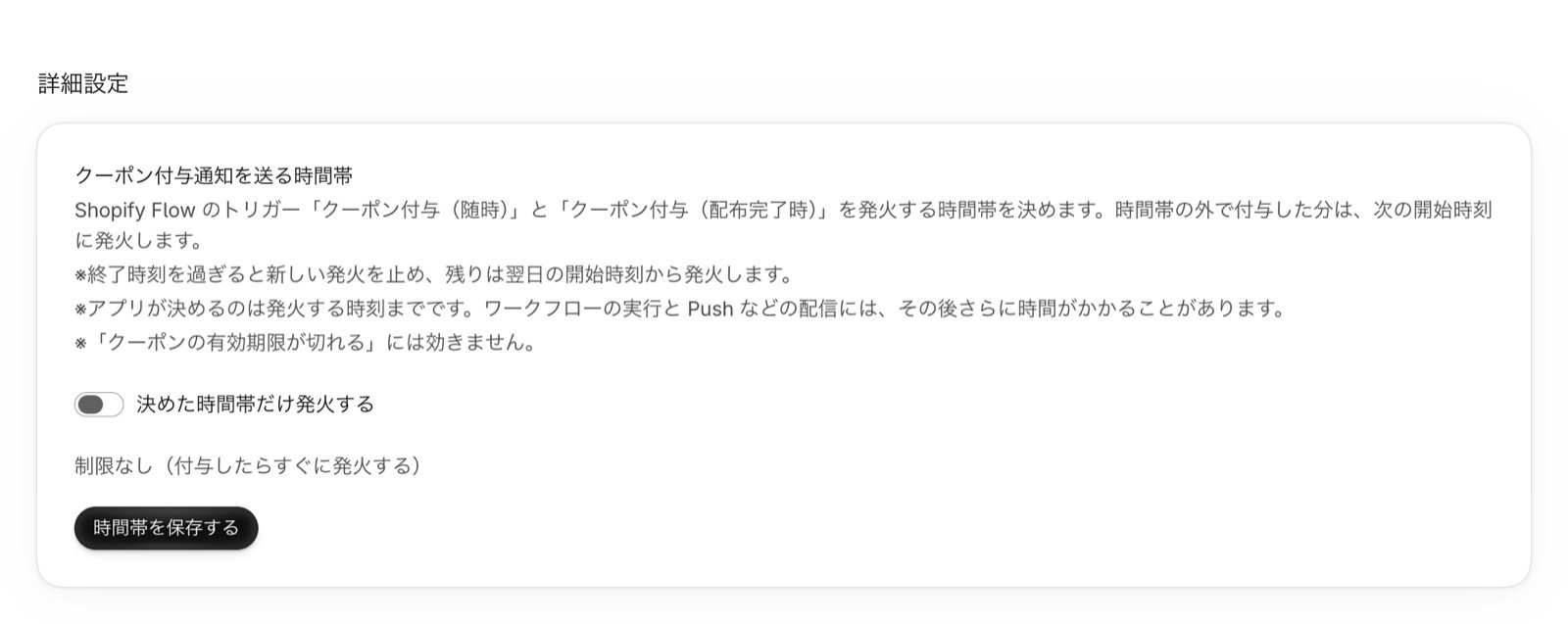
1
Open Settings & support
Open Settings & support from the app’s menu and find “Coupon grant notification hours” in Advanced. It starts as “No limit (run the trigger as soon as a coupon is granted)”.
2
Choose the hours
Turn on the “Run the trigger only during set hours” switch, then choose the “Start” and “End” times in one-hour steps. Start is 0 to 23 and End is 1 to 24, and End must be later than Start. Hours that cross midnight (such as 22:00 to 6:00) can’t be set.Times are interpreted in your store’s time zone (the Shopify setting). The time zone is shown on the card.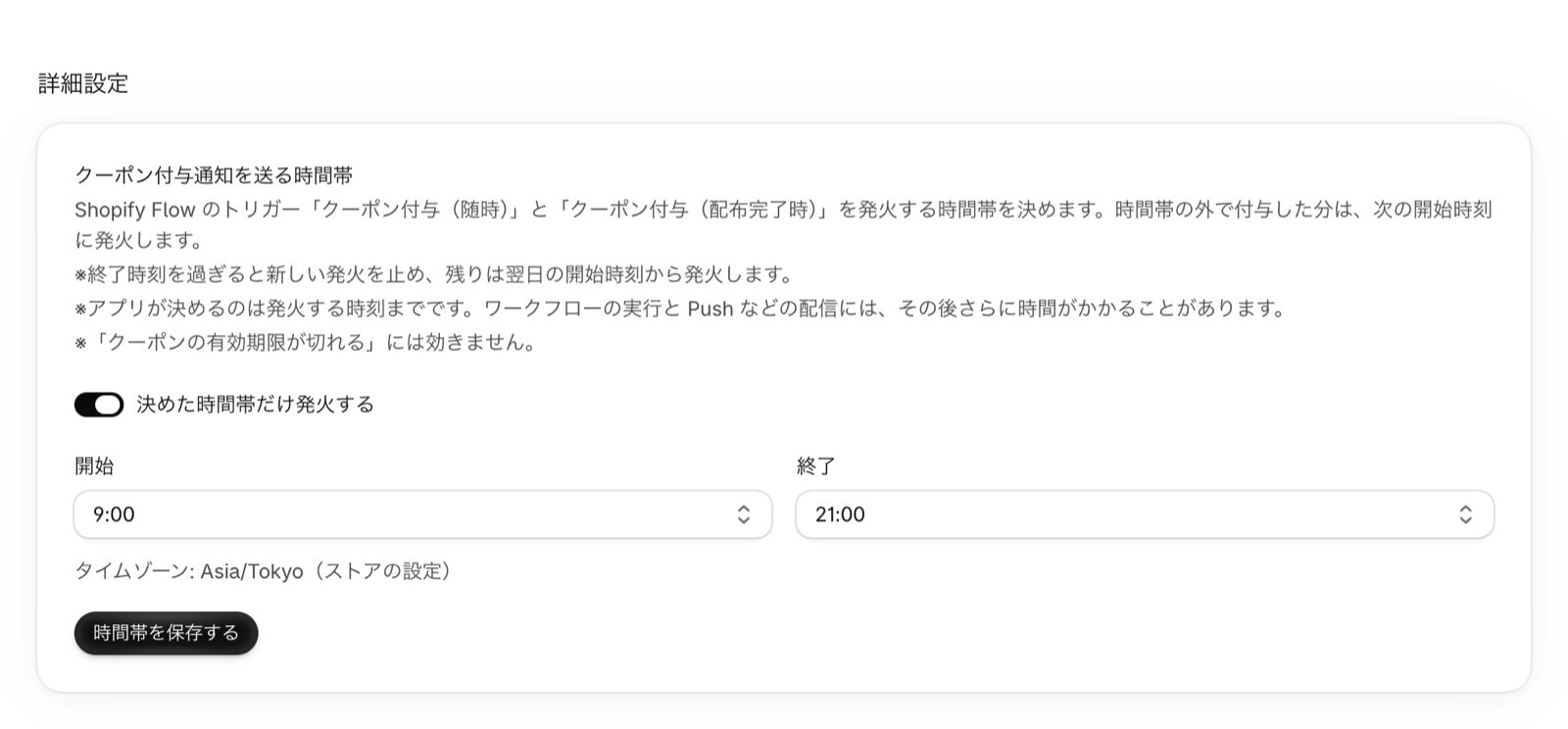
3
Save
Press “Save hours”. To remove the limit, turn off the “Run the trigger only during set hours” switch and save. While it is off, “No limit (run the trigger as soon as a coupon is granted)” is shown.
- The start time is included and the end time is not. With 9:00 to 21:00, triggers run between 9:00:00 and 20:59:59
- Coupons granted outside the hours run the trigger at the next start time. A customer who registers at night is notified at the next morning’s start time
- After the end time, no new triggers run. The rest continue from the start time on the next day. If a large distribution crosses the end time, some customers are notified that day and the rest the next day
- Changes to the hours apply right away, including to notifications already waiting
The hours don’t apply to the “coupon will expire” trigger. Coupon expiry notification is started by a scheduled Shopify Flow workflow at the time you choose.
Please note
- If you turn off the distribution complete workflow even temporarily, notifications waiting for the distribution to finish are discarded. Turning it off and on during a distribution means that distribution is not notified
- A customer whose coupon was granted through more than one route, such as someone who registered during a distribution, may be notified twice (rare)
- Coupons that are hidden, deleted, or expired while the distribution complete trigger is waiting are not notified
- If a distribution hasn’t finished after 7 days, the waiting notifications are discarded
- The available plans are the same as for “Coupon granted (anytime)”. Not available on the Free plan
FAQ
I turned on the distribution complete workflow, but no notification arrives
I turned on the distribution complete workflow, but no notification arrives
Check the following.
- It runs only for the distribution when you display a coupon. It doesn’t run for new customers or for joining a segment
- It doesn’t run while the distribution is still in progress. Check in the coupon list that the sync has completed
- If you set notification hours, it waits until the next start time
- Coupons granted before the workflow was turned on don’t run the trigger
A customer got the notification twice
A customer got the notification twice
Check that your “Coupon granted (anytime)” workflow has the condition “Grant source is not equal to initial_distribution”. Without it, the initial distribution is sent from both triggers.Even with the condition, a customer whose coupon was granted through more than one route, such as someone who registered during a distribution, may rarely be notified twice.
I set notification hours, but a notification arrived after the end time
I set notification hours, but a notification arrived after the end time
The app controls only when the trigger runs. Triggers that run just before the end time can arrive later, after the workflow runs and the notification is delivered. Set an end time with some margin.
Can I set hours that cross midnight, such as 22:00 to 6:00?
Can I set hours that cross midnight, such as 22:00 to 6:00?
No. The end time must be later than the start time. To avoid late-night notifications, set daytime hours such as 9:00 to 21:00.