

Adopted Shopify's new authentication method (expiring access tokens)
What changedDiscount Deck now uses the authentication method that Shopify requires for public apps when it accesses your store’s data. The credentials the app uses to connect to your store now have an expiry and are renewed automatically as it approaches. Because the same credentials are no longer used for long periods, your store’s data is better protected.Shopify makes this method mandatory for all public apps from January 1, 2027. Discount Deck has completed the change ahead of that date.Stores already using the app have been switched over as well, with no reinstall or re-approval needed. Coupon display and sync work the same as before.What you need to doNothing.Who this affectsAll merchantsRelease dateOctober 14, 2026
Coupons limited to customer segments or specific customers now sync faster when they cover a few thousand customers
What changedFor coupons whose eligibility is limited to customer segments or specific customers, syncs now finish faster when a few thousand customers are eligible, so coupons appear on the account page sooner.When you release a coupon to a segment such as a membership tier or repeat buyers, it reaches those customers quickly.For typical sync times, see How long it takes for coupons to appear.What you need to doNothing.Who this affectsStores using discounts whose Eligibility is set to Specific customer segments or Specific customersRelease dateOctober 6, 2026
Coupons with sync errors can now be selected and retried together
What changedOn the Sync Errors tab of the coupon list, you can now select several coupons and run “Retry sync for selected coupons”. Select coupons on the page you are viewing, and the sync restarts for all of them at once. Expired coupons are hidden from the account page when they are retried.After you run a retry, if any coupons were not retried, the count and the reason (for example, deleted in Shopify) are shown on the screen.While sync errors remain, you can still select coupons on the other tabs and show or hide them on the account page together.What you need to doNothing.Who this affectsAll stores using Discount DeckRelease dateOctober 5, 2026
Coupons can now be shown to customer segments based on Shopify Email activity
What changedFor coupons whose eligibility is limited to customer segments, Discount Deck can now read the members of more complex segments, such as segments based on Shopify Email delivery activity, and show the coupon on their account page.For example, you can send a campaign with Shopify Email and give a coupon only to the customers who received it. Because the offer appears both in the email and on the account page, customers who read the email can use the coupon right away.What you need to doNothing.Who this affectsStores using discounts whose Eligibility is set to Specific customer segmentsRelease dateOctober 5, 2026
Coupons for all customers displayed one after another are now synced together and reach the account page sooner
What changedWhen several coupons whose eligibility is all customers are displayed one after another, Discount Deck now groups up to 50 coupons waiting to sync and shows them on the account page in a single sync.Previously each coupon was synced for every customer one at a time, so in stores with many customers it could take a long time for coupons to appear on the account page when automatic display created coupons in quick succession or when you displayed several at once from the coupon list. Now, even when you publish several coupons at once for the start of a sale, they reach your customers quickly.For typical sync times, see How long it takes for coupons to appear.What you need to doNothing.Who this affectsStores showing coupons for all customers on the account pageRelease dateOctober 1, 2026
Coupons limited to customer segments now sync faster
What changedFor coupons whose eligibility is limited to customer segments, Discount Deck now reads only the customers who belong to the segment. In stores with many customers, displaying or retrying a sync could take hours or never finish; it now takes much less time.What you need to doNothing.Who this affectsStores using discounts whose Eligibility is set to Specific customer segmentsRelease dateSeptember 29, 2026
Use Coupon codes not shown on the account page to keep coupons off the account page, however they would be displayed
What changedOn the Settings・Support page, “Coupon codes excluded from automatic display” is now “Coupon codes not shown on the account page”.Coupons whose code contains a keyword you register are not shown on the account page, whichever way they would be displayed: automatic display, displaying from the coupon’s detail page, or displaying several at once from the coupon list. You can use it even if you do not use automatic display.The coupon is only hidden from the account page. The coupon itself still works, and customers who have the code can use it at checkout as usual.Ideas for using it
- Secret sales — send the code only to invited customers, without showing it on other customers’ account pages
- Coupons for newsletter or LINE subscribers — make it a perk that only people who received the message know about
- Employee discounts — keep staff coupons out of sight of regular customers
- Influencer and affiliate codes — have the code used only by customers who came through the referral
- Apology or thank-you coupons — send them individually to specific customers
- Coupons handed out in store or at events — have them used only by the people who received them there
SECRET or STAFF to the start of the code for each campaign, one keyword covers every coupon in it.How to set it upGo to Settings・Support > Automatic Coupon Display, enter a keyword in “Coupon codes not shown on the account page”, click Add, and then click Save in the save bar. For details, see Set coupon codes not shown on the account page.Please note- Keywords are matched partially. Registering a short word such as
OFFalso hides unintended coupons such as10OFF - Keywords apply to coupons created after you register them. To hide a coupon that is already shown on the account page, use “Hide coupons on the account page” on the coupon’s detail page
- Not available on the Free plan
Fixed coupons limited to customer segments sometimes disappearing from the account page after a sync
What changedWe fixed a problem with coupons whose eligibility is limited to customer segments. If Discount Deck could not get the list of customers in a segment from Shopify during a sync, the coupon could disappear from the account page of every customer who had it. Because the sync still finished as if nothing went wrong, it did not appear in the Sync Errors tab either.From now on:
- If the list cannot be retrieved temporarily, Discount Deck retries automatically
- If it still cannot be retrieved, the sync stops without changing any customer’s coupons, and the coupon appears in the Sync Errors tab
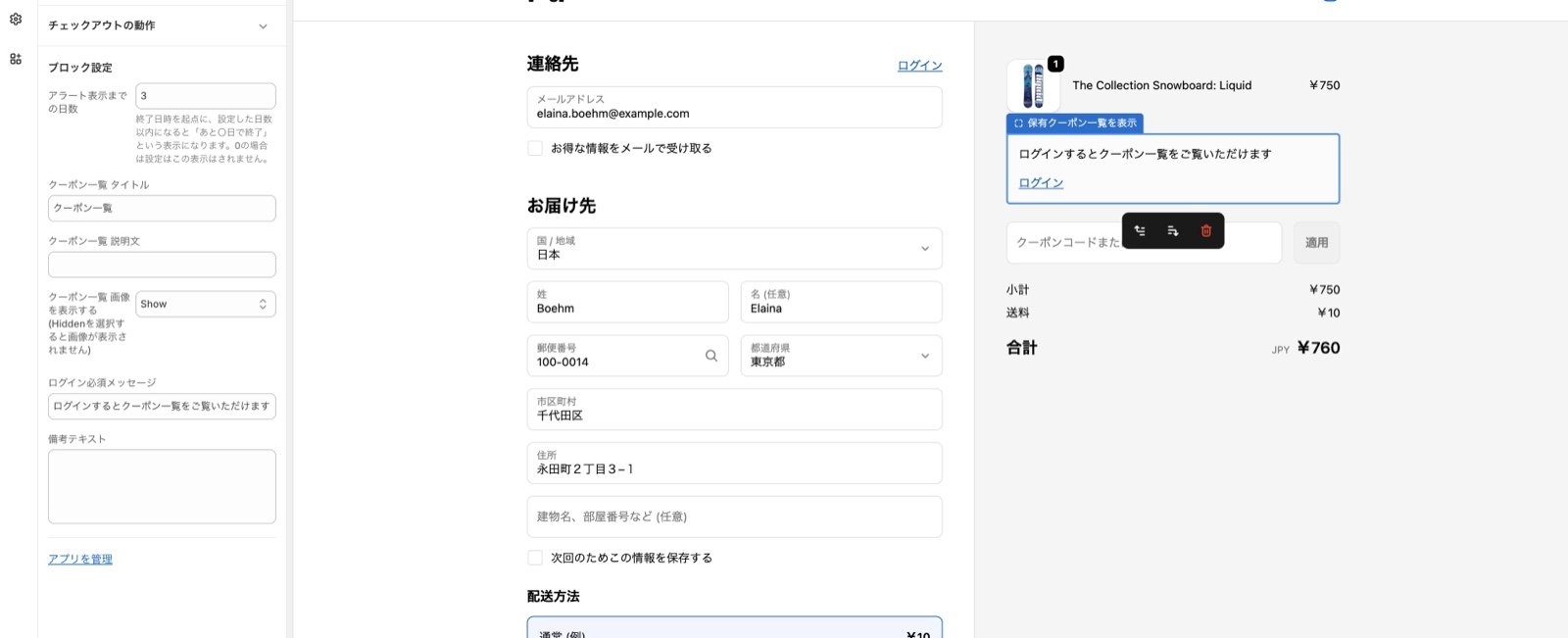
The coupon list at checkout now matches the account page in design and settings
What changedThe coupon list shown at checkout now looks the same as the coupon list on the account page (customer accounts). Until now, the same customer could see two differently designed coupon lists.The following settings, previously available only on the account page, can now also be used at checkout.
- ボタンのレイアウト (button layout) — choose Primary, Secondary, or Text
- 備考のレイアウト (note alignment) — align the note text on each coupon Left, Center, or Right
- セクションの枠線を非表示にする (hide the section border)
You no longer need to change the metafield access by hand when coupons do not appear on the account page
What changedOn stores that have used the app for a while, the coupon list on the account page (new customer accounts) could show that there are no coupons, even when the customer had some. This happened because “Customer account API access” on the metafield the app uses was still set to “No access”, and until now you had to change it to “Read” yourself.From now on, the app checks this setting when you open it in the Shopify admin and changes “No access” to “Read” automatically. If it is set to “Read and write”, it is left as it is.What you need to doNothing. If coupons were not appearing on the account page, open Discount Deck in the Shopify admin once.Who this affectsStores using the coupon list on new customer accountsRelease dateSeptember 24, 2026
Sync Customer Coupons on the customer detail page now shows a message when a sync fails
What changedWhen a sync fails in Sync Customer Coupons on the customer detail page, the screen now shows “Sync failed”. Until now nothing was shown when a sync failed, and the button simply went back to Sync, so it looked as if nothing had happened.There are two messages, depending on the cause.
- If the app could not process the request, the message asks you to wait a moment and try again
- If the app could not be reached, the message asks you to check your network connection
Fixed coupon syncing not completing on stores with a large number of customers
What changedWe fixed a problem where, on stores with a large number of customers, syncing which coupons are shown or hidden could run out of time and stop in a failed state.Syncing now has more time to finish, and it retries automatically if it does run out of time. This makes it less likely for changes to be missing from the account page.What you need to doNothing.Who this affectsStores with a large number of customersRelease dateSeptember 18, 2026
Hide several coupons from the account page at once from the coupon list
What changedYou can now select several coupons in the coupon list and hide them from the account page in one action.How to set it upIn the coupon list, select the coupons and click Hide from Account Page.Please note
- Only coupons that are currently shown on the account page can be hidden. Coupons that are already hidden are skipped, even if you select them
- Coupons that are being shown, hidden, or resynced are skipped as well
- Hiding a coupon does not delete the discount in Shopify. It only stops the coupon from appearing on the account page
Show the coupon list as a dedicated page opened from the account menu
What changedOn the new customer accounts, the coupon list can now also be shown as a standalone page that customers open from the header menu.The existing block on the profile page is still available.
What it shows and the settings you have already saved are unchanged.How to set it upGo to Settings > Checkout > Customize (bottom left), open customer accounts to launch the editor, and add お持ちのクーポン一覧 from the apps icon in the top left. Choose アカウント when it asks where to add the page, and the item is added to the header menu.See the manual for the full steps and screenshots.If you use the new customer accountsPlease noteThe existing block and the dedicated page are separate features, so settings such as the title and description are not shared. If you use both, you need to configure each one separately.Who this affectsStores using the coupon list on the new customer accountsRelease dateSeptember 14, 2026
Fixed coupons set to display automatically not appearing on the account page
What changedWe fixed a problem where coupons could fail to appear on your customers’ account page if you turned on automatic coupon display right after installing the app.What you need to doNothing.Who this affectsStores that turned on automatic coupon display right after installing the appRelease dateSeptember 11, 2026
Fixed a sync error count that was higher than the actual number of errors
What changedWe fixed a problem where the sync error count shown on the coupon list could be higher than the number of rows in the sync error tab.It happened because error records were left behind for coupons that had been deleted in Shopify. Those records were included in the count, but since the coupon no longer existed they did not appear in the tab, and they could not be re-synced either.The app now checks periodically and clears out records for coupons that no longer exist in Shopify.What you need to doNothing. After this update the count and the tab match.Who this affectsAll merchantsRelease dateSeptember 10, 2026
Exclude specific coupons from automatic display
What changedYou can now use automatic coupon display while keeping specific coupons off the account page.Register a keyword in the settings screen and any coupon whose code contains it is no longer shown on the account page. This is for coupons you issue but do not want every customer to see, such as staff discount codes.How to set it upGo to settings and support > automatic coupon display and enter the keywords you want to exclude.
- Matching is done on the coupon code, not the coupon name
- It is a partial match, so
GENTEIalso excludesGENTEI10% - Case and character width are ignored
- Up to 20 keywords
- Coupons already shown on the account page stay visible. Adding a keyword is not applied retroactively
- Excluded coupons can no longer be selected in the coupon list, so they cannot be shown manually either
- Not available on the free plan
Renamed the first coupon list tab to Valid Coupons
What changedIn the app admin, the first tab of the coupon list is now called Valid Coupons instead of All.That tab only ever listed active and scheduled coupons, never expired ones, so the previous name did not match what it showed.Who this affectsAll merchantsWhereThe coupon list in the app admin only. Nothing changes on the account page or at checkout.Release dateSeptember 1, 2026
Changed the support contact link
What changedThe Contact button in the app admin now opens our support desk.Who this affectsAll merchantsRelease dateAugust 24, 2026
The no coupons available message can now be edited
What changedYou can now change the message shown when a customer has no coupons to display.It used to be fixed text, which left overseas stores unable to adjust the wording. Like the title, description, and login message, you can now override it from the settings screen.How to set it upThe setting has been added in all three places the message appears. Change it wherever you show the list.
- Checkout
- New customer accounts
- Account page (theme extension)
Added the Shopify Flow trigger Coupon granted
What changedWe added a Shopify Flow trigger, Coupon granted, that fires when a coupon is given to a customer.It fires at the moment the customer can see the coupon on their account page. In Flow you can filter on the coupon name and connect the trigger to a push notification or email app to tell the customer about it.How to set it upSee the guide below.Coupon issued notificationWho this affectsAll merchantsRelease dateAugust 21, 2026
Sending the notification itself is configured in the notification app you use.
Coupon expiry notifications
What changedYou can now send coupon expiry reminders.How to set it upSee the guide below.Coupon expiry notificationWho this affectsAll merchantsRelease dateJuly 16, 2026
Sidekick App Extensions support
What changedDiscount Deck and MultiLikes now support App Extensions for Shopify Sidekick.When you use Sidekick in your Shopify admin, you can look up how each app works and how to configure it more easily than before.If you are unsure how to use or configure an app, ask Sidekick and it will answer from the app’s documentation.Example questionsDiscount Deck
- “Show me the coupons this customer holds.”
- “Tell me how this customer has used their coupons.”
- “Which products and brands gained favorites in the last week?”
- “Which products have the most favorites?”
[Completed] Discount Deck update (morning of June 16, 2026)
The update completed at 11:30 on June 16.
The maximum upload file size increased from 20MB to 100MBUp to 5 bulk operations can now run concurrently per shop- The sync processing that runs on our backend.
- Coupons load faster.
- Storefront appearance
- The app admin
- The values written to customer metafields
API version update
What changedFollowing a Shopify platform update, we upgraded to the API version that had to be adopted by April 1, 2026, resolving the notice shown in our admin.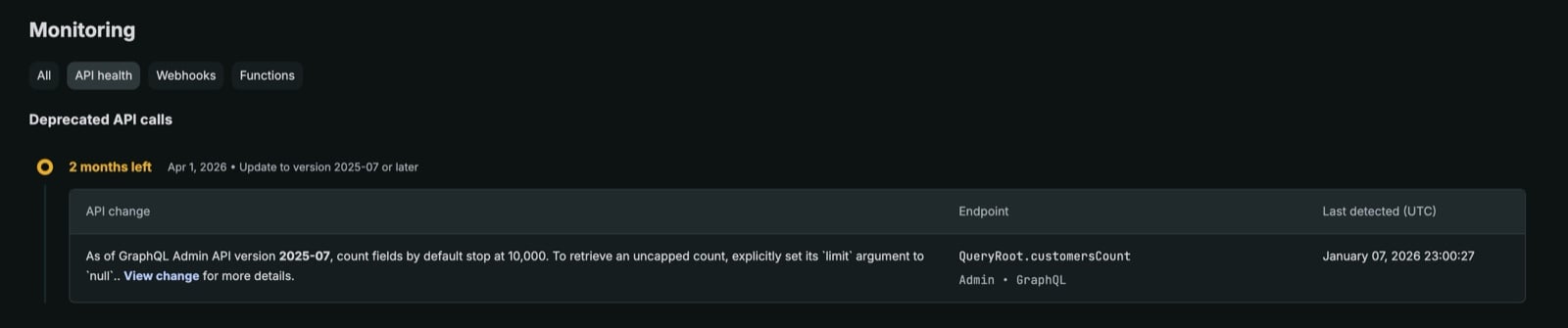
Coupons are now ordered by nearest expiry
What changedCoupons are now listed with the nearest expiry first, which makes the list easier to use.Who this affectsAll merchantsWhereEverywhere in the coupon list popup.Release dateJanuary 6, 2026
Pricing simulator
What changedWe published a pricing simulator on the demo site, so usage-based costs are clear at a glance.https://discount-deck.bouquet-inc.com/pages/plan-simulatorWho this affectsAll merchantsRelease dateJanuary 5, 2026
Now available outside Japan
What changedThe app can now be used by merchants outside Japan.Who this affectsAll merchantsRelease dateDecember 24, 2025
Coupon images can now be hidden
What changedYou can now hide coupon images across your storefront in one setting.Account page (legacy customer accounts)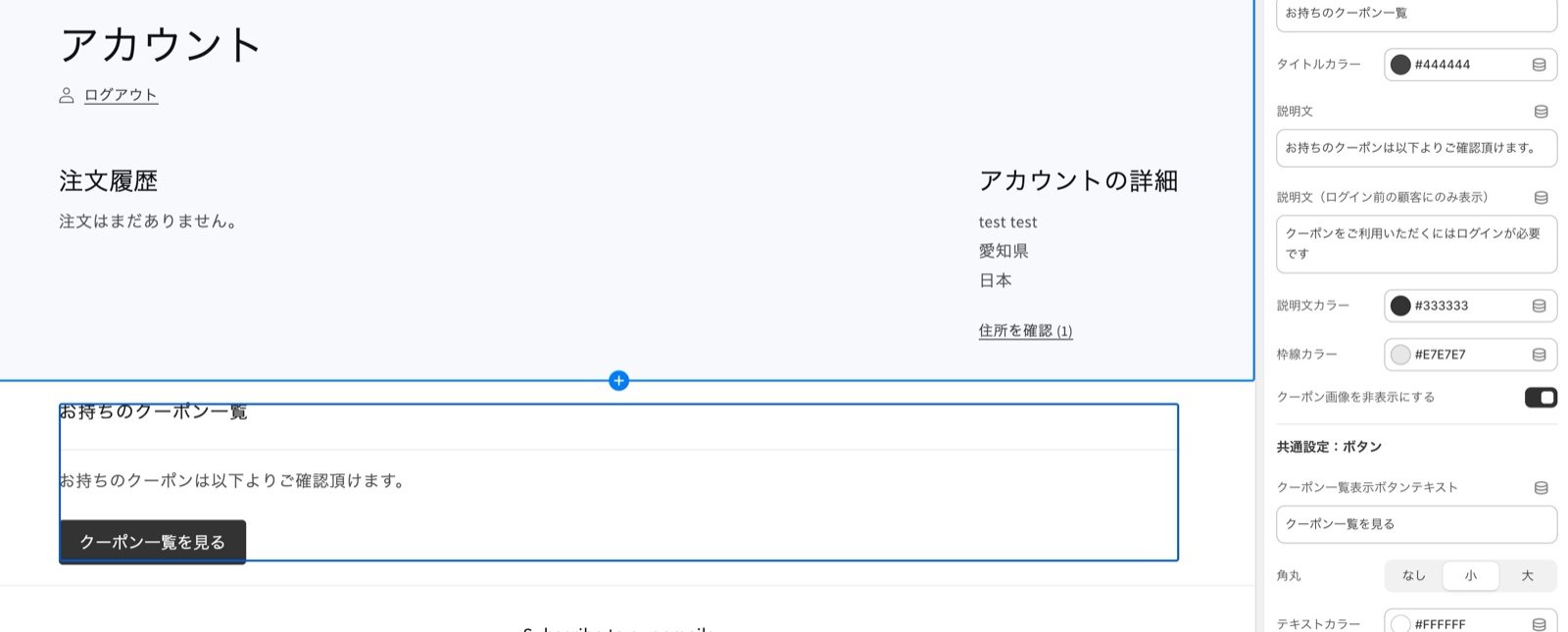
The app block gained a setting to hide coupon images. Turn it on and the images are hidden.
The app block gained a setting for showing coupon images, and the option you pick controls whether they appear.
Improvements to the coupon list in the admin
What changedWe improved the coupon list shown in the Shopify admin:
- Coupons named for point redemption are now always hidden
- These are generated when points are redeemed through the VIP app, and they add noise to the list
- Filtering behaves better
Internal error alerting
What changedIf an error occurs during coupon syncing, our team is now alerted internally.This lets us spot errors sooner, so we can:
- Resolve them faster
- Including letting affected merchants know
Sync coupons for a single customer from their detail page
What changedOn each customer’s detail page under Customers in the Shopify admin, we added a button to sync the coupons shown to that customer, so you can do it for one person in a single click.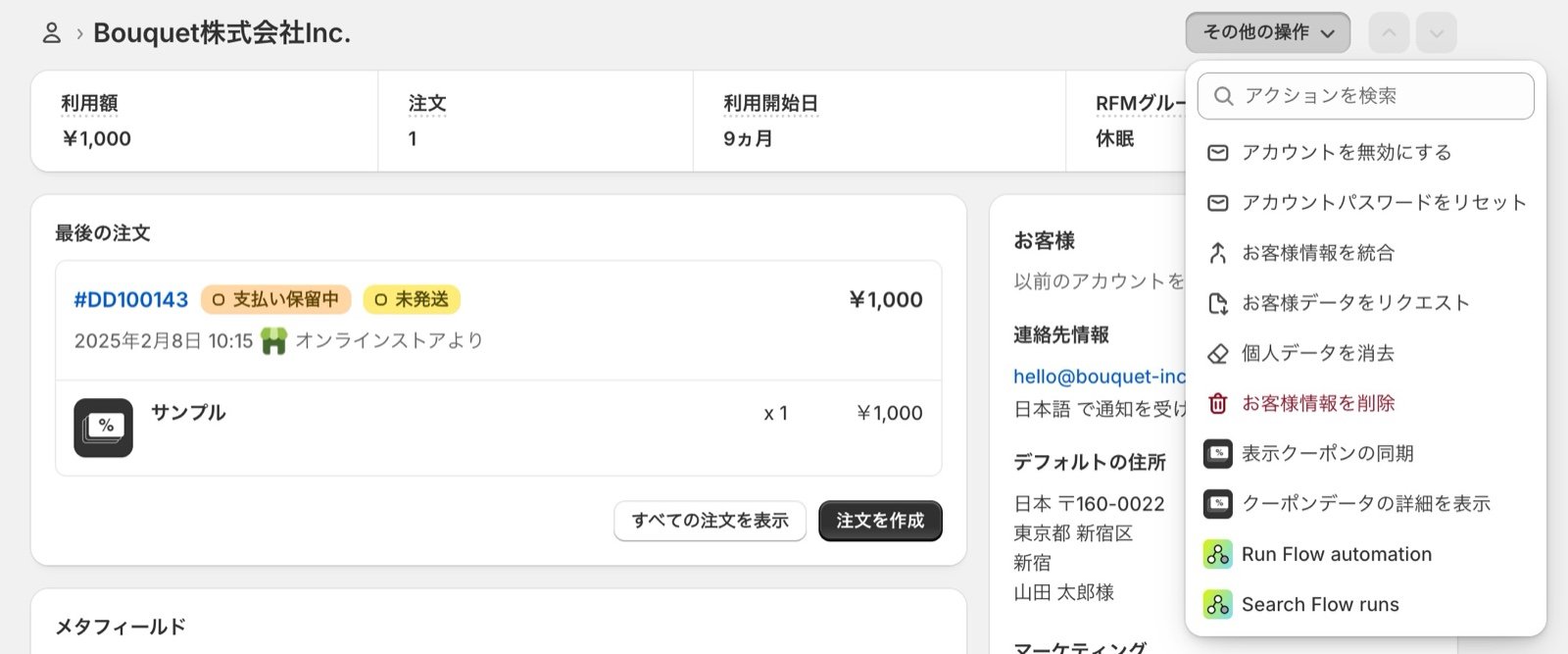
This is not intended for everyday use. It is a feature for customer support.
- A customer reports that no coupons appear on their account page
- You run the sync for that customer from their detail page
- You let them know once it finishes
See a customer's coupons from their detail page
What changedOn each customer’s detail page under Customers in the Shopify admin, you can now see the list of coupons that customer holds.Who this affectsAll merchantsRelease dateOctober 20, 2025
Coupon sync status is now visible
What changedOn the coupon list page in the app admin we added:
- Sync status
- A retry option when a sync fails
Faster coupon syncing (part 2)
How it worked beforeSyncing wrote coupon codes into customer metafields as text.Why we changed itWhen a single sync covered many coupons or many customers, the amount of text stored in customer metafields made syncing slow.How it works nowCoupon data written to customer metafields is now encoded, and we:What you need to doNothing.Release dateAugust 29, 2025
- Run coupon syncing in parallel
- Reworked the processing itself
We can also carry out the work for you.
App Store listing refreshed
What changedOur Shopify App Store listing has been redesigned.https://apps.shopify.com/discount-deckRelease dateJuly 28, 2025
Support for the new customer accounts
What changedDiscount Deck now supports Shopify’s new customer accounts, so stores using them can use the app.How to set it upSee this guide.Setup instructions are also shown in the app admin.Release dateJuly 22, 2025
Fixed a sync problem on the account page
The problemFor stores with more than 50 coupons, selecting the header checkbox and then choosing to select all in the app’s coupon list only selected the 50 coupons currently displayed.The fixSelecting all now correctly selects every coupon.We are sorry for the trouble this caused.What you need to doNothing.Release dateJuly 4, 2025
Faster coupon syncing
How it worked beforeInternally, coupon syncing ran serially for every store.How it works nowAs more stores began using the app, we:
- Run coupon syncing in parallel
- Reworked the processing itself
Improved how coupons are displayed by default
How it looked before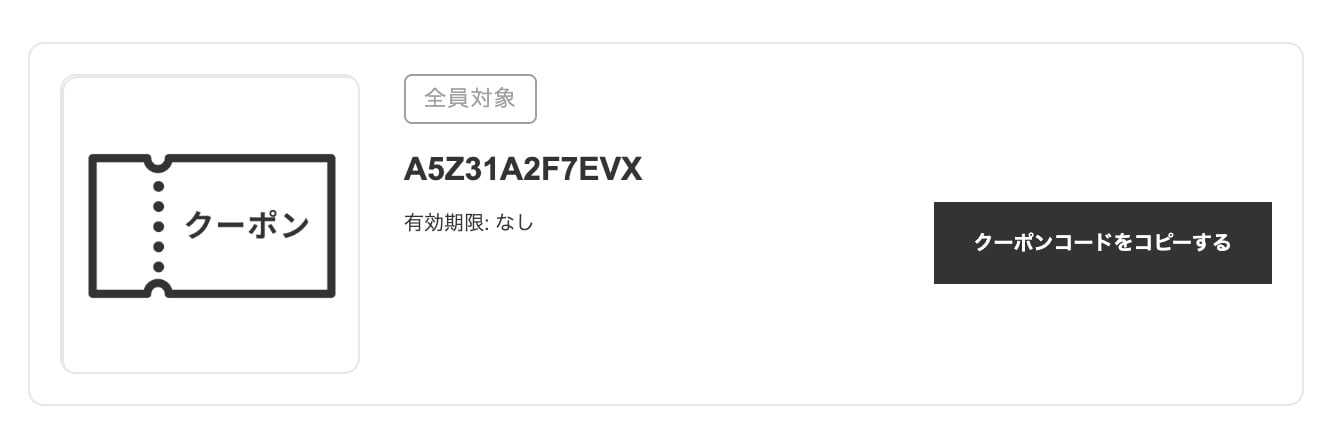
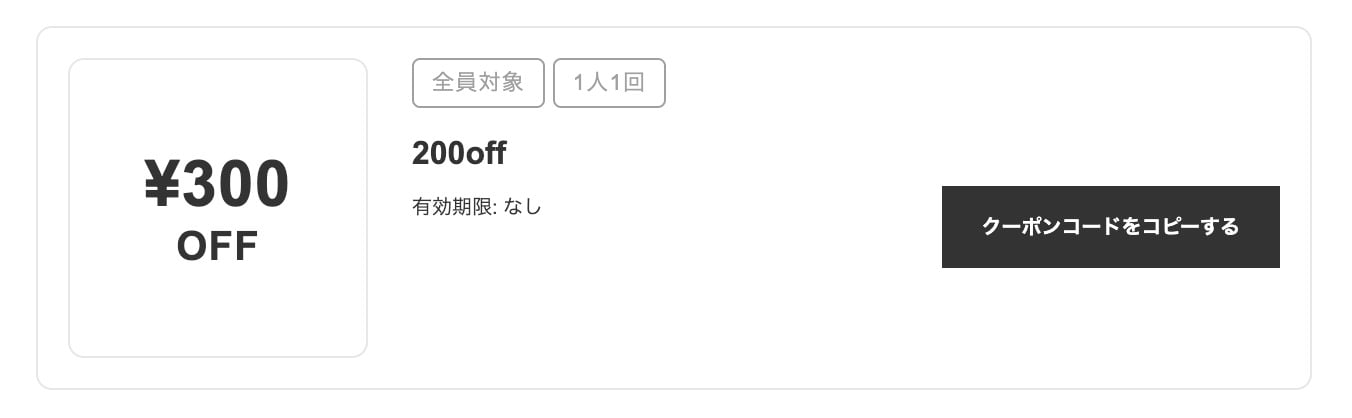
- Coupon image: changed to text, with support for Japanese, English, Traditional Chinese, and Simplified Chinese.
- Labels: added a “once per customer” label so the restriction is explicit.
- Localization: Japanese and English are supported.
Coupons can now be displayed automatically

- The existing behavior
- After issuing a coupon, you select it in the app’s coupon list and press the button to show it.
- The new behavior
- Coupons appear on the account page automatically as soon as they are issued.
Checkout extension support
The coupon list can now be shown on the checkout page.