

See sales from favorites in Google Analytics 4 (GA4)
What changedYou can now see purchases and revenue from sessions in which customers opened a page from their favorites list, right in your store’s Google Analytics 4 (GA4). Find out how much your favorites feature contributes to sales, in the GA4 you already use.There is nothing to set up in GA4, in your theme, or in the app.Links in the favorites list that point to pages in your store now carry a
multilikes URL parameter. Each type of favorite has its own value, so you can also compare products, brands, stores, and more.How to see it in GA4In GA4, create an exploration and add a session segment for sessions where Page location contains
multilikes=wishlist. Add purchase and revenue metrics to see the results from favorites. To look at one type of favorite, use the full value, such as multilikes=wishlist-product. For step-by-step instructions and how sessions from favorites are identified, see See sales from favorites in GA4.Use it to compare sales before and after you change where the favorite button appears or how customers reach their favorites list, or to see which favorites (products, brands, or stores) drive the most sales.What you need to doNothing. The parameter is added automatically in every store.Who this affectsAll merchantsRelease dateOctober 14, 2026Choose the unit for favorites data export
What changedWhen exporting favorited product data, you can now choose whether to output it per product or per variant.Per variant gives you one row per SKU, which is what you want when you need favorite counts broken down by size or color.Who this affectsAll merchantsRelease dateSeptember 7, 2026
Corrected the Shopify Flow trigger descriptions
What changedWe corrected the descriptions shown in the Shopify Flow trigger list.The English description for the restock trigger was the same as the one for the low stock trigger, which made the two hard to tell apart when picking a trigger in the Flow editor. We also reviewed the titles and descriptions of the other triggers.Who this affectsAll merchantsRelease dateAugust 31, 2026
It can take a short while for the change to appear in the Flow editor.
Added a Shopify Flow action for bulk updating brand and store favorites
What changedWe added a Shopify Flow action that adds and removes brand or store favorites in a single call.Until now there was only an action that handled one item at a time. When several of those ran at once, a write could overwrite the one before it. For example, adding store A and store B at the same time from an empty list could leave only B.The new action writes all the changes in one go, so that cannot happen. It is safe to run even while a customer is using the storefront.How to set it upIn the Shopify Flow action list, choose the bulk update action for metaobject (brand and store) favorites, then set:
- Customer ID
- Metaobject type (brand or store)
- The items to add and remove, in JSON
- The existing single-item actions still work
- If the input is malformed, we tell you both when the workflow is saved and in the Flow run log
Brands can now have a collection
What changedYou can now set a collection on a brand metaobject.When a collection is set, the brand’s image and text on the storefront link through to that collection page.We also tidied up the help text under the brand logo and collection fields in the admin.Who this affectsAll merchantsRelease dateAugust 17, 2026
Sidekick App Extensions support
What changedDiscount Deck and MultiLikes now support App Extensions for Shopify Sidekick.When you use Sidekick in your Shopify admin, you can look up how each app works and how to configure it more easily than before.If you are unsure how to use or configure an app, ask Sidekick and it will answer from the app’s documentation.Example questionsDiscount Deck
- “Show me the coupons this customer holds.”
- “Tell me how this customer has used their coupons.”
- “Which products and brands gained favorites in the last week?”
- “Which products have the most favorites?”
Choose what happens when the favorite button is pressed
What changedFor the favorite button shown across your pages, you can now choose between: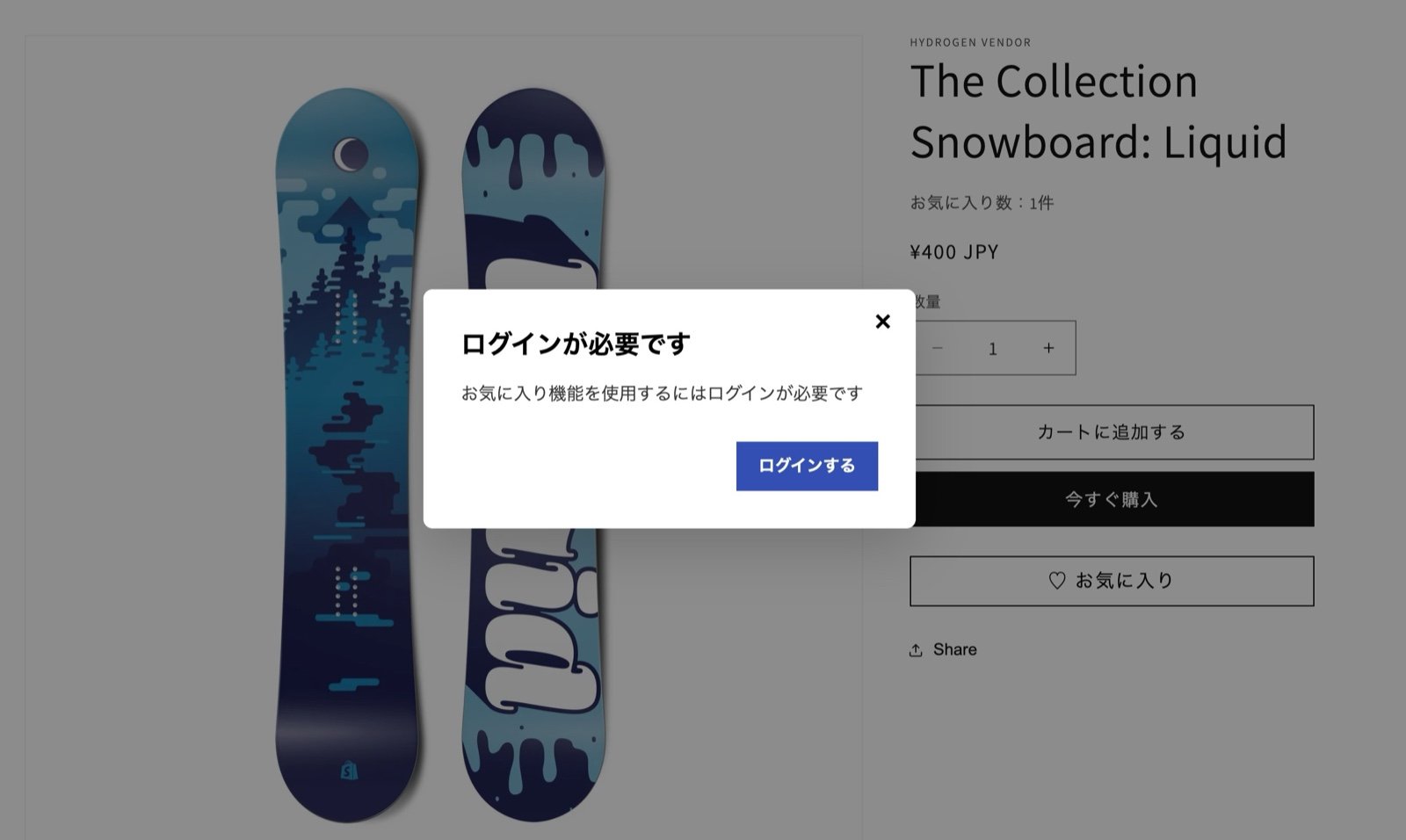
- Sending the customer to the login page
- Showing a popup
Low stock alerts can now use a per-collection threshold
What changedLow stock alerts for favorited products can now use a different stock threshold per collection.For example:
- The “TOPS” collection
- Alert when 10 units remain
- The “Restock” collection
- Alert when 2 units remain
Price drop alerts gained new conditions
What changedWe added the following conditions to the Shopify Flow that sends price drop alerts:
- The price dropped by at least a given percentage
- The price dropped by at least a given amount
Released
What changedThe app is published on the Shopify App Store.https://apps.shopify.com/multilikesWho this affectsAll merchantsRelease dateMarch 5, 2026